
Picture your new remote hire, Alex. It’s 9:03 AM on their first day. They’re excited, a little nervous, and sitting at their newly assembled desk with a fresh cup of coffee. They open their company-shipped laptop. They log in.
And then… nothing.
Silence. No welcome email. No Slack invitation. No calendar invites. They have no idea who to talk to or what to do first. The excitement quickly turns into a mix of anxiety and confusion. By lunchtime, they’re already scrolling through LinkedIn, wondering if they made a huge mistake.
This scenario isn’t just a hypothetical nightmare; it’s the reality at thousands of companies that have embraced remote work without building the IP infrastructure to support it. They treat remote onboarding as simply a digital version of the in-office checklist, forgetting that you can’t just casually lean over a cubicle to ask for the Wi-Fi password when you’re 2,000 miles away.
Great remote onboarding isn’t about a flurry of activity on Day 1. It’s about a deliberate, thoughtful, and systemised process that begins weeks before your new hire even touches their keyboard. It’s the difference between an employee who feels like an integrated, valued team member in 30 days and one who quietly quits within 6 months.
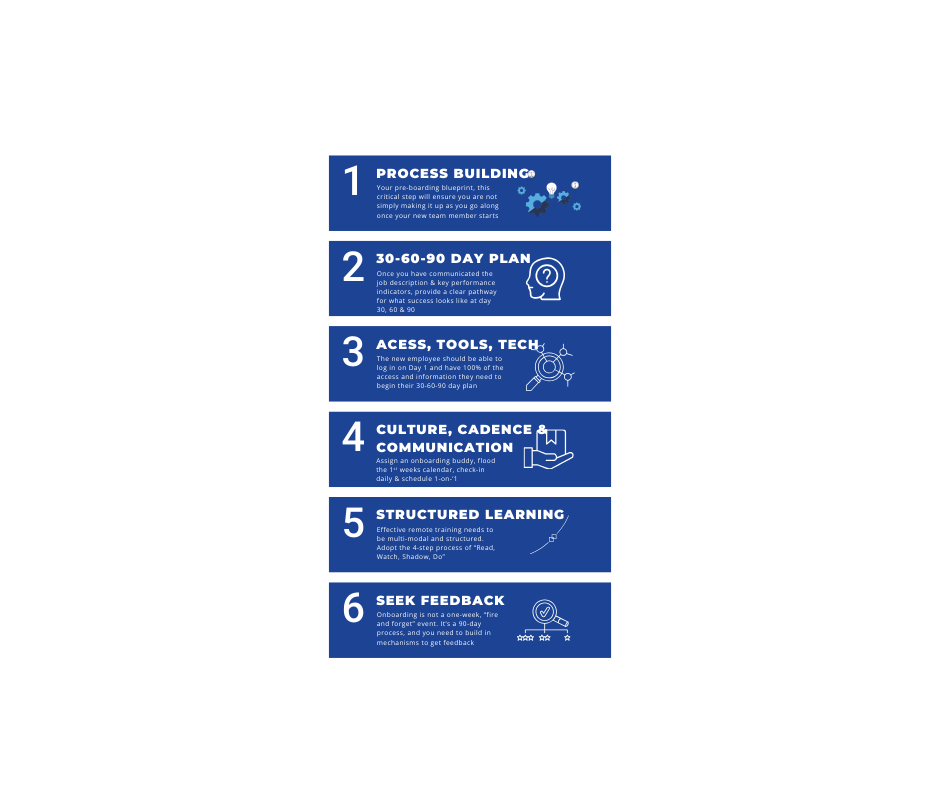
If you’re ready to stop scrambling and start building a world-class remote onboarding experience that boosts retention, accelerates productivity, and builds a stronger culture, you’re in the right place. Here are the 6 essential steps to get it right.
First, Why Does This Matter So Much?
Before we dive into the “how,” let’s anchor ourselves in the “why.” A sloppy onboarding process is more than just a bad first impression. It’s a direct drain on your bottom line and your team’s morale.
- Retention: According to research by Glassdoor, businesses with a strong onboarding process improve new hire retention by a staggering 82%. When people feel supported and set up for success from day one, they are far less likely to become part of the costly turnover statistic.
- Productivity: A structured onboarding process can boost new hire productivity by over 70%. Without a clear roadmap, new employees waste weeks trying to figure out who’s who, what tool does what, and where to find critical information. A great process gives them a clear path from learning to contributing.
- Engagement & Culture: Onboarding is your first, best chance to immerse someone in your company culture. It’s where you prove that your values aren’t just words on a website. In a remote setting, this intentional connection is the glue that holds your team together.
Simply put, you can’t afford to get this wrong. Now, let’s build the system that gets it right.
Step 1: The Pre-Boarding Blueprint: Process Building
The single biggest mistake companies make is starting the onboarding process after the offer letter is signed. Most small business owners assume staff will simply know what to do on their first day. Now, granted, in some cases, they will. If you have just hired a CFO, COO or CEO, they should walk in on day and take control. But 99% of hiring is not the senior strategic positions.
The best remote onboarding programs are 90% preparation and 10% execution. You need to build a repeatable, scalable system before you even post the job description.
Think of it this way: you wouldn’t build a house without a blueprint. Why would you build a team member’s entire career foundation on the fly?
Your goal is to create a master onboarding template in your project management tool of choice (Asana, Trello, ClickUp, Monday.com—it doesn’t matter which, just that you use one). This template is a comprehensive checklist that can be duplicated for every new hire, ensuring no detail is ever missed.
What to include in your Master Onboarding Template:
- Phase 1: Pre-Boarding (Offer Signed to Day 1):
- [HR] Send official welcome email with start date, time, and first-day agenda.
- [IT] Order and ship hardware (laptop, monitor, headset, etc.) to arrive 2-3 days before their start date.
- [HR] Initiate background check and all necessary digital paperwork (I-9, W-4, direct deposit).
- [MANAGER] Send a personal welcome message via email or LinkedIn.
- [MANAGER] Prepare the 30-60-90 Day Plan (more on this in a second).
- [TEAM] Record short “welcome to the team” Loom videos
- Phase 2: Week 1 Onboarding:
- [IT] Create all software accounts and add credentials to the password manager.
- [MANAGER] Schedule all Week 1 meetings: daily check-ins, team introductions, key stakeholder 1:1s.
- [HR] Schedule benefits orientation.
- [MANAGER] Assign an “Onboarding Buddy.”
This blueprint turns a chaotic process into a calm, predictable one. It allows you to focus on the human element because the logistics are already handled.
Step 2: Crystal-Clear Expectations: The JD & 30-60-90 Day Plan
Ambiguity is the enemy of a new remote employee. They can’t absorb information by osmosis or overhear conversations that provide context. You have to be ruthlessly explicit about what success looks like, and that starts by transforming the job description into a concrete plan of action.
This is where the 30-60-90 Day Plan becomes your most powerful tool. It’s a document that outlines clear goals, learning objectives, and performance expectations for the first 3 months. It answers the new hire’s most pressing, unspoken question: “How do I win in this role?”
Share this document on Day 1. Walk them through it. It provides a roadmap that reduces anxiety and empowers them to take ownership of their own onboarding.
Here’s a sample structure:
- First 30 Days: Learning & Integration
- Focus: Absorb, learn, and connect. The goal is not to be a top performer but to build a strong foundation.
- Sample Goals/KPIs:
- Complete all required HR and IT security training modules.
- Read and understand key company documents (brand guide, process wiki, etc.).
- Have 1:1 introductory meetings with all members of the immediate team and two key cross-functional partners.
- Successfully shadow three customer calls and provide a summary of key takeaways.
- KPI: Learning Velocity. Can they articulate the company mission and team purpose?
- Days 31-60: Contributing & Executing
- Focus: Begin applying knowledge and taking ownership of smaller, well-defined tasks. Move from passive learning to active contribution.
- Sample Goals/KPIs:
- Take ownership of a small, recurring team process (e.g., compiling a weekly report).
- Contribute to one active project under the guidance of a senior team member.
- Independently handle and resolve five Tier 1 customer support tickets.
- KPI: Initial Contribution. Are they successfully completing assigned tasks with decreasing supervision?
- Days 61-90: Owning & Accelerating
- Focus: Transition to full ownership of core responsibilities. Begin identifying areas for improvement and operating with more autonomy.
- Sample Goals/KPIs:
- Independently manage the full lifecycle of a core task or project.
- Propose one tangible improvement to an existing team process or workflow.
- Achieve a primary performance metric consistent with the role’s ongoing expectations (e.g., close $X in new business, reduce ticket response time by Y%).
- KPI: Autonomous Performance. Are they meeting the core expectations of the role as defined in the job description?
This plan is a living document, but it provides the structure that remote employees crave.
Step 3: The Digital Welcome Kit: Access, Tools, and Tech
Nothing screams “we’re disorganised” like a new hire who can’t log in to anything on their first day. The logistical component of remote onboarding is critical. A seamless tech experience signals competence and care.
Your goal: The new employee should be able to log in on Day 1 and have 100% of the access and information they need to begin their 30-60-90 day plan.
- Hardware First: As mentioned in Step 1, their laptop and peripherals must arrive before their start date. Include a simple, one-page PDF guide with setup instructions, key contacts for IT support, and what to expect on their first morning.
- Centralise Access with a Password Manager: Don’t send passwords over Slack or email. Use a secure password manager (like 1Password or LastPass) to create a “New Hire Vault.” On Day 1, you grant them access to this single vault, which contains the credentials for everything else. It’s secure, efficient, and scalable.
- Create a “Tool Stack Guide”: Don’t just give them access to 20 different SaaS apps. Create a simple document (in Notion, a Google Doc, or your company wiki) that explains the purpose of each tool.
- Slack: For real-time, informal communication. Here are our key channels (#general, #team-marketing, #random-chatter).
- Asana: Our single source of truth for project work. All tasks must live here. Here’s a 5-minute Loom video on how our team uses it.
- HubSpot: Our CRM. This is where all customer data lives.
- Notion: Our company wiki. If you have a question, search here first.
This context transforms a confusing list of apps into a functional digital workspace.
Step 4: The Human Connection: Culture, Cadence, and Communication
In an office, culture is built through hundreds of micro-interactions: hallway chats, grabbing lunch, overhearing a senior leader’s phone call. Remotely, all of these opportunities vanish. You must intentionally and deliberately architect moments for human connection.
Don’t leave connection to chance. Schedule it.
- Assign an Onboarding Buddy: This is arguably the most important part of remote cultural integration. The buddy should not be their manager. They are a friendly peer who can answer the “stupid questions” the new hire might be afraid to ask their boss: “What’s the deal with all the GIFs in the marketing channel?” or “Is it okay to block off my calendar for lunch?”
- Flood Their First Week’s Calendar: A new hire’s empty calendar is a source of anxiety. Fill it for them with a mix of learning and social events.
- Daily Manager Check-in: A quick 15-minute call at the beginning or end of each day for the first week.
- Virtual Team Lunch: Have the company expense a meal for the entire team and hop on a video call for 45 minutes of non-work chat.
- Scheduled 1:1s: Pre-book 20-minute “get to know you” calls with key collaborators. Provide both parties with a few icebreaker questions to get the conversation flowing.
- A “Welcome” Ritual: Announce their arrival in a main company channel with a fun bio and a picture. Encourage everyone to chime in with a welcome message and a GIF.
These scheduled touchpoints create a sense of belonging and psychological safety from the very beginning.
Step 5: Structured Learning: Read–>Watch–>Shadow–>Do
“Here’s a link to our Google Drive, let me know if you have questions.” That isn’t training; it’s an abdication of responsibility.
Effective remote training needs to be multi-modal and structured. People learn in different ways, so your onboarding should cater to that. Create a clear learning path that moves the employee from passive consumption to active participation.
- Read (Asynchronous): Provide access to your well-organised company wiki or knowledge base (e.g., Notion, Confluence, Zoho Connect). This includes Standard Operating Procedures (SOPs), process documents, and company policies.
- Watch (Asynchronous): Build a library of short, pre-recorded videos using a tool like Loom. These are perfect for screen-sharing and walking through specific software workflows. A 5-minute video on “How to Submit an Expense Report” is infinitely more effective than a 5-page PDF.
- Shadow (Synchronous): Have the new hire sit in on live calls (sales demos, customer support calls, team meetings). The goal is observation and context-gathering.
- Do (Supervised): The final step is to give them a small, low-risk, real-world task. For an engineer, it might be fixing a tiny, well-documented bug. For a marketer, it could be drafting a single social media post for review. This first small win is a massive confidence booster.
Step 6: The Feedback Loop: Check-In, Listen, and Iterate
Onboarding is not a one-week, “fire and forget” event. It’s a 90-day process, and you need to build in mechanisms to get feedback on both the employee’s experience and the process itself.
Without a feedback loop, you’re just guessing. You’ll keep making the same mistakes with every new hire.
Implement a formal check-in cadence:
- End of Day 1: A 5-minute call with their manager. “How was your first day? Any tech roadblocks? Any immediate questions?” This catches major logistical issues right away.
- End of Week 1: A 30-minute 1:1. “What was the most confusing thing this week? Who do you feel you still need to meet? How are you feeling about the pace?”
- End of 30 Days: A formal review of the 30-60-90 plan. “How are you progressing against your 30-day goals? What resources or support do you need to hit your 60-day goals?”
- End of 90 Days: A final review of the onboarding plan and a look ahead. And crucially, ask: “Now that you’ve been through it, what is one thing we could do to make our onboarding process better for the next person?”
This last question is gold. It turns your new hires into co-creators of your onboarding system, ensuring it gets better and more refined with every person who joins your team.
Onboarding is a Product, Not a Project
Your remote onboarding process is not just an HR checklist; it’s a product that you offer to your new employees. And like any great product, it needs to be designed with the user in mind, built with intention, and continuously iterated upon based on feedback.
By investing the time upfront to build a structured, repeatable, and human-centric system, you do more than just get a new employee up to speed. You send a powerful message from Day 1: “We are a professional, thoughtful organisation. We are invested in your success. You belong here.”In the competitive landscape of remote work, that message is your ultimate advantage.
Ready to start hiring work-from-home talent? Click here to schedule an exploratory call